# Agentic Infrastructure
> [!NOTE]
> **Enterprise-Grade AI Agent Support System**
This document describes the comprehensive agentic infrastructure that powers the AI Coding Tools platform. Beyond the core Orchestrator and Agentic Team engines, we provide a complete ecosystem of specialized agents, skills, MCP tools, and a graph-based context system that enables AI agents to learn and improve over time.
---
## Table of Contents
- [Overview](#overview)
- [Architecture](#architecture)
- [Specialized Agents](#specialized-agents)
- [Skills Library](#skills-library)
- [MCP Tools](#mcp-tools)
- [Graph Context System](#graph-context-system)
- [Project-Scoped Context](#project-scoped-context)
- [Portability and Multi-Project Support](#portability-and-multi-project-support)
- [Domain Rules](#domain-rules)
- [Integration](#integration)
- [Best Practices](#best-practices)
- [Production Readiness](#production-readiness)
---
## Overview
The AI Coding Tools platform provides not just orchestration capabilities, but a complete **agentic infrastructure** that empowers AI agents to accomplish any development task effectively. This infrastructure includes:
```mermaid
graph TB
subgraph "🧠 Agentic Infrastructure"
direction TB
subgraph "Specialized Agents"
WEB[Web Frontend]
API[Backend API]
SEC[Security]
DEVOPS[DevOps]
AIML[AI/ML]
DB[Database]
MOBILE[Mobile]
PERF[Performance]
DOCS[Documentation]
end
subgraph "Skills Library"
DEV_SKILLS[Development Skills]
TEST_SKILLS[Testing Skills]
SEC_SKILLS[Security Skills]
OPS_SKILLS[DevOps Skills]
ML_SKILLS[AI/ML Skills]
DOC_SKILLS[Documentation Skills]
end
subgraph "MCP Tools"
CODE_TOOLS[Code Analysis]
SEC_TOOLS[Security Scanning]
TEST_TOOLS[Testing Utils]
OPS_TOOLS[DevOps Tools]
CTX_TOOLS[Context Memory]
end
subgraph "Graph Context System"
GRAPH[(Graph Store)]
EMBED[Embeddings]
BM25[BM25 Index]
HYBRID[Hybrid Search]
end
end
subgraph "🤖 AI Agents"
CLAUDE[Claude]
CODEX[Codex]
GEMINI[Gemini]
COPILOT[Copilot]
OLLAMA[Ollama]
LLAMA[llama.cpp]
end
WEB & API & SEC --> CLAUDE & CODEX
DEV_SKILLS & TEST_SKILLS --> GEMINI & COPILOT
CODE_TOOLS & SEC_TOOLS --> OLLAMA & LLAMA
GRAPH --> HYBRID
HYBRID --> CTX_TOOLS
```
### Key Capabilities
| Capability | Description | Components |
|------------|-------------|------------|
| **Domain Expertise** | 9 specialized agents covering all development domains | `.claude/agents/`, `.codex/agents/` |
| **Reusable Skills** | 22 skills across 6 categories for common tasks | `.claude/skills/` |
| **MCP Integration** | 34+ tools for code analysis, security, testing, DevOps | `mcp_server/tools/` |
| **Persistent Memory** | Graph-based context with hybrid search | `orchestrator/context/` |
| **Domain Rules** | Best practices and coding standards | `.claude/rules/`, `.codex/rules/` |
---
## Architecture
### Component Overview
```mermaid
flowchart TD
subgraph "User Request"
USER[👤 Developer]
end
subgraph "Entry Points"
CLI[CLI Shell]
WEB[Web UI]
MCP[MCP Server]
end
subgraph "Orchestration Layer"
ORCH[Orchestrator Engine]
TEAM[Agentic Team Engine]
end
subgraph "Agentic Infrastructure"
direction TB
subgraph "Agent Selection"
AGENTS[Specialized Agents]
RULES[Domain Rules]
end
subgraph "Skill Resolution"
SKILLS[Skills Library]
end
subgraph "Tool Execution"
TOOLS[MCP Tools]
end
subgraph "Context & Memory"
CONTEXT[Graph Context]
SEARCH[Hybrid Search]
end
end
subgraph "AI Backends"
CLOUD[Cloud AI
Claude, Codex, Gemini, Copilot]
LOCAL[Local AI
Ollama, llama.cpp]
end
USER --> CLI & WEB & MCP
CLI & WEB --> ORCH & TEAM
MCP --> TOOLS
ORCH & TEAM --> AGENTS
AGENTS --> RULES
AGENTS --> SKILLS
AGENTS --> TOOLS
TOOLS --> CONTEXT
CONTEXT --> SEARCH
AGENTS --> CLOUD & LOCAL
```
### Directory Structure
```
AI-Coding-Tools-Collaborative/
├── .claude/
│ ├── agents/ # 9 specialized Claude agents
│ │ ├── web-frontend.md
│ │ ├── backend-api.md
│ │ ├── security-specialist.md
│ │ ├── devops-infrastructure.md
│ │ ├── ai-ml-engineer.md
│ │ ├── database-architect.md
│ │ ├── mobile-developer.md
│ │ ├── performance-engineer.md
│ │ └── documentation-writer.md
│ ├── skills/ # 22 reusable skills
│ │ ├── development/ # 6 development skills
│ │ ├── testing/ # 4 testing skills
│ │ ├── security/ # 4 security skills
│ │ ├── devops/ # 3 DevOps skills
│ │ ├── ai-ml/ # 3 AI/ML skills
│ │ └── documentation/ # 3 documentation skills
│ └── rules/ # Domain-specific rules
│ ├── security.md
│ ├── database.md
│ ├── api-design.md
│ ├── performance.md
│ └── ai-ml.md
├── .codex/
│ ├── agents/ # 9 specialized Codex agents (TOML)
│ └── rules/ # Codex domain rules
├── orchestrator/
│ └── context/ # Graph context system
│ ├── schemas.py # Node & edge types
│ ├── graph_store.py # SQLite + FTS5
│ ├── embeddings.py # Sentence transformers
│ ├── bm25_index.py # BM25 keyword search
│ ├── hybrid_search.py # RRF fusion search
│ └── memory_manager.py# High-level API
└── mcp_server/
└── tools/ # 5 MCP tool modules
├── code_analysis.py # 4 code analysis tools
├── security_tools.py# 4 security tools
├── testing_tools.py # 4 testing tools
├── devops_tools.py # 5 DevOps tools
└── context_tools.py # 7 context memory tools
```
---
## Specialized Agents
The platform provides 9 specialized agents, each with deep domain expertise:
```mermaid
mindmap
root((Specialized
Agents))
Web Development
web-frontend
React/Vue/Angular
CSS/Tailwind
Accessibility
Backend
backend-api
REST/GraphQL
Microservices
Authentication
database-architect
Schema Design
Query Optimization
Migrations
Security
security-specialist
OWASP Top 10
Vulnerability Scanning
Secure Coding
Infrastructure
devops-infrastructure
Docker/K8s
CI/CD
Cloud Platforms
performance-engineer
Profiling
Optimization
Load Testing
AI/ML
ai-ml-engineer
ML Pipelines
LLM Integration
RAG Systems
Mobile
mobile-developer
React Native
Flutter
Native iOS/Android
Documentation
documentation-writer
API Docs
Architecture
README
```
### Agent Capabilities Matrix
| Agent | Languages | Frameworks | Specializations |
|-------|-----------|------------|-----------------|
| **web-frontend** | JS/TS, CSS | React, Vue, Angular, Svelte | Components, State, A11y |
| **backend-api** | Python, Go, Node | FastAPI, Express, Django | REST, GraphQL, gRPC |
| **security-specialist** | All | All | OWASP, Pen Testing, Audits |
| **devops-infrastructure** | YAML, HCL | Docker, K8s, Terraform | CI/CD, Cloud, IaC |
| **ai-ml-engineer** | Python | PyTorch, LangChain, FAISS | ML Ops, RAG, Embeddings |
| **database-architect** | SQL | PostgreSQL, MySQL, MongoDB | Schema, Indexing, Scaling |
| **mobile-developer** | Dart, JS, Swift | Flutter, RN, SwiftUI | Cross-platform, Native |
| **performance-engineer** | All | k6, Locust, cProfile | Profiling, Caching, CDN |
| **documentation-writer** | Markdown | OpenAPI, Mermaid | API Docs, Diagrams |
### Usage Examples
```bash
# Claude with specialized agent
claude -a security-specialist "Review this authentication code"
claude -a backend-api "Design a REST API for user management"
claude -a ai-ml-engineer "Build a RAG pipeline with vector search"
# Codex with specialized agent
codex --agent devops-infrastructure "Create Kubernetes deployment"
codex --agent database-architect "Optimize this slow query"
```
---
## Skills Library
Skills are reusable templates that guide AI agents through specific tasks:
```mermaid
graph LR
subgraph "📚 Skills Library"
subgraph "Development"
RC[react-components]
RA[rest-api-design]
PA[python-async]
DQ[database-queries]
GD[graphql-development]
EH[error-handling]
end
subgraph "Testing"
UT[unit-testing]
IT[integration-testing]
TD[test-driven-development]
PT[performance-testing]
end
subgraph "Security"
IV[input-validation]
AU[authentication]
SC[secure-coding]
VA[vulnerability-assessment]
end
subgraph "DevOps"
DC[docker-containerization]
CI[ci-cd-pipelines]
KD[kubernetes-deployment]
end
subgraph "AI/ML"
ER[embeddings-retrieval]
LI[llm-integration]
RP[rag-pipeline]
end
subgraph "Documentation"
AD[api-documentation]
AR[architecture-docs]
CD[code-documentation]
end
end
```
### Skill Structure
Each skill follows a consistent structure:
```markdown
# Skill Name
## Purpose
What this skill accomplishes.
## Triggers
Keywords that activate this skill.
## Steps
1. Step-by-step instructions
2. With concrete guidance
3. And verification steps
## Examples
Code examples and patterns.
## Best Practices
Guidelines for effective use.
## Related Skills
Links to complementary skills.
```
### Skills by Category
#### Development Skills (6)
| Skill | Description |
|-------|-------------|
| `react-components` | Build React components with hooks and best practices |
| `rest-api-design` | Design RESTful APIs following conventions |
| `python-async` | Write async Python code properly |
| `database-queries` | Write optimized SQL queries |
| `graphql-development` | Build GraphQL schemas and resolvers |
| `error-handling` | Implement proper error handling |
#### Testing Skills (4)
| Skill | Description |
|-------|-------------|
| `unit-testing` | Write comprehensive unit tests |
| `integration-testing` | Create integration tests for APIs |
| `test-driven-development` | Follow TDD methodology |
| `performance-testing` | Write load and performance tests |
#### Security Skills (4)
| Skill | Description |
|-------|-------------|
| `input-validation` | Validate and sanitize user inputs |
| `authentication` | Implement secure auth patterns |
| `secure-coding` | Follow secure coding practices |
| `vulnerability-assessment` | Assess and fix vulnerabilities |
#### DevOps Skills (3)
| Skill | Description |
|-------|-------------|
| `docker-containerization` | Create optimized Docker images |
| `ci-cd-pipelines` | Build CI/CD workflows |
| `kubernetes-deployment` | Deploy to Kubernetes clusters |
#### AI/ML Skills (3)
| Skill | Description |
|-------|-------------|
| `embeddings-retrieval` | Work with embeddings and vectors |
| `llm-integration` | Integrate LLMs into applications |
| `rag-pipeline` | Build RAG pipelines |
#### Documentation Skills (3)
| Skill | Description |
|-------|-------------|
| `api-documentation` | Generate OpenAPI/Swagger docs |
| `architecture-docs` | Create architecture documentation |
| `code-documentation` | Write code comments and docstrings |
---
## MCP Tools
The Model Context Protocol (MCP) server provides 34+ tools across 5 categories:
```mermaid
graph TB
subgraph "🔧 MCP Tools (34+)"
subgraph "Code Analysis"
CA1[analyze_python_complexity]
CA2[find_code_patterns]
CA3[analyze_dependencies]
CA4[generate_code_summary]
end
subgraph "Security Scanning"
SS1[scan_secrets]
SS2[scan_injection_risks]
SS3[check_security_headers]
SS4[audit_dependencies_security]
end
subgraph "Testing Utilities"
TU1[generate_test_cases]
TU2[generate_test_stub]
TU3[analyze_test_coverage]
TU4[parse_test_results]
end
subgraph "DevOps Tools"
DO1[analyze_dockerfile]
DO2[analyze_compose_file]
DO3[check_ci_config]
DO4[generate_deploy_checklist]
DO5[analyze_env_config]
end
subgraph "Context Memory"
CM1[store_conversation]
CM2[store_task_result]
CM3[search_context]
CM4[get_relevant_context]
CM5[log_mistake]
CM6[store_pattern]
CM7[get_context_stats]
end
end
```
### Tool Categories
#### Code Analysis Tools
```yaml
analyze_python_complexity:
description: "Analyze cyclomatic complexity and code metrics"
inputs: [file_path]
outputs: [complexity_score, functions, classes, metrics]
find_code_patterns:
description: "Detect design patterns and anti-patterns"
inputs: [directory, patterns_to_find]
outputs: [patterns_found, locations, suggestions]
analyze_dependencies:
description: "Analyze project dependencies and relationships"
inputs: [project_path]
outputs: [dependencies, versions, conflicts, updates]
generate_code_summary:
description: "Generate natural language summary of code"
inputs: [file_path]
outputs: [summary, key_functions, dependencies]
```
#### Security Tools
```yaml
scan_secrets:
description: "Scan code for hardcoded secrets and credentials"
inputs: [directory, patterns]
outputs: [secrets_found, severity, locations]
scan_injection_risks:
description: "Detect SQL injection and XSS vulnerabilities"
inputs: [file_path, language]
outputs: [vulnerabilities, severity, remediation]
check_security_headers:
description: "Verify HTTP security headers configuration"
inputs: [url_or_config]
outputs: [headers_present, headers_missing, recommendations]
audit_dependencies_security:
description: "Audit dependencies for known vulnerabilities"
inputs: [requirements_file]
outputs: [vulnerabilities, severity, updates_available]
```
#### Testing Tools
```yaml
generate_test_cases:
description: "Generate test cases for functions/classes"
inputs: [code, framework]
outputs: [test_cases, edge_cases, mocks]
generate_test_stub:
description: "Generate test file skeleton"
inputs: [source_file, test_framework]
outputs: [test_file_content]
analyze_test_coverage:
description: "Analyze and report test coverage"
inputs: [coverage_file]
outputs: [coverage_percent, uncovered_lines, recommendations]
```
#### DevOps Tools
```yaml
analyze_dockerfile:
description: "Analyze Dockerfile for best practices"
inputs: [dockerfile_path]
outputs: [issues, optimizations, security_concerns]
check_ci_config:
description: "Validate CI/CD configuration"
inputs: [config_file, platform]
outputs: [valid, errors, suggestions]
generate_deploy_checklist:
description: "Generate deployment checklist"
inputs: [environment, deployment_type]
outputs: [checklist_items, pre_deploy, post_deploy]
```
#### Context Memory Tools
```yaml
store_conversation:
description: "Store conversation in context memory"
inputs: [content, metadata]
outputs: [conversation_id]
search_context:
description: "Search context using hybrid search"
inputs: [query, limit]
outputs: [results, scores]
log_mistake:
description: "Log mistake for future learning"
inputs: [error_description, context, correction]
outputs: [mistake_id]
```
---
## Graph Context System
The Graph Context System provides persistent memory with intelligent retrieval:
```mermaid
graph TB
subgraph "📊 Graph Context System"
subgraph "Storage Layer"
SQLITE[(SQLite DB)]
FTS5[FTS5 Index]
VECTORS[(Vector Store)]
end
subgraph "Node Types"
CONV[ConversationNode]
TASK[TaskNode]
MISTAKE[MistakeNode]
PATTERN[PatternNode]
DECISION[DecisionNode]
CODE[CodeSnippetNode]
PREF[PreferenceNode]
end
subgraph "Edge Types"
RT[RELATED_TO]
CB[CAUSED_BY]
FB[FIXED_BY]
ST[SIMILAR_TO]
DO[DEPENDS_ON]
LF[LEARNED_FROM]
end
subgraph "Search Engine"
BM25[BM25 Index]
EMBED[Embeddings
all-MiniLM-L6-v2]
RRF[RRF Fusion]
end
subgraph "API"
MM[MemoryManager]
end
end
CONV & TASK & MISTAKE --> SQLITE
SQLITE --> FTS5
EMBED --> VECTORS
BM25 --> RRF
EMBED --> RRF
RRF --> MM
MM --> CONV & TASK & MISTAKE
```
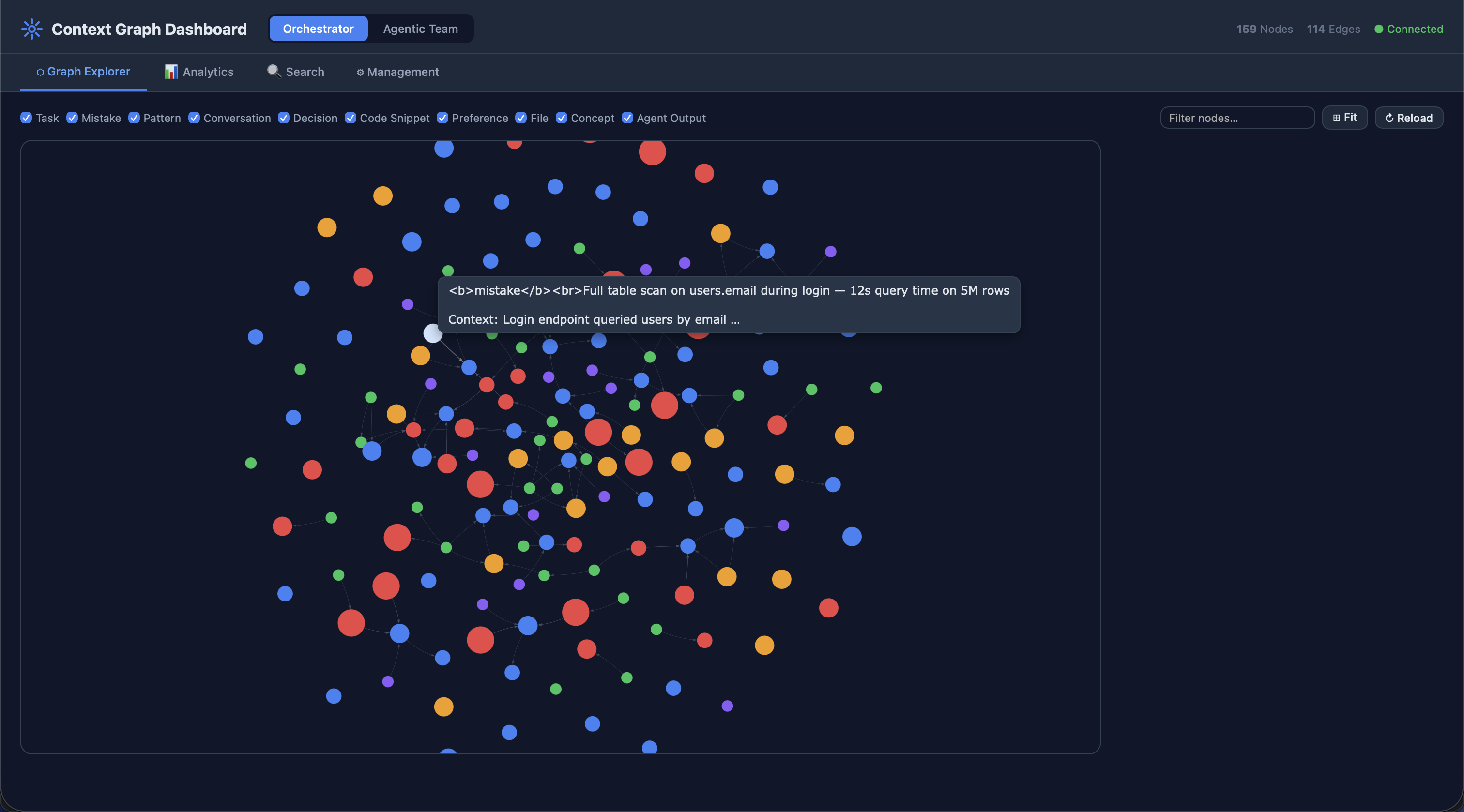
### Node Types
| Type | Purpose | Key Fields |
|------|---------|------------|
| `ConversationNode` | Store past conversations | content, metadata |
| `TaskNode` | Record completed tasks | task_description, outcome, success |
| `MistakeNode` | Log errors for learning | error_description, context, correction |
| `PatternNode` | Store recognized patterns | pattern_type, examples |
| `DecisionNode` | Record architectural decisions | decision, rationale |
| `CodeSnippetNode` | Store useful code snippets | language, code, purpose |
| `PreferenceNode` | Store user preferences | preference_type, value |
| **File** | `FILE` | Source file metadata (path, language, size, framework) |
| **Concept** | `CONCEPT` | Abstract concepts and domain knowledge |
| **Project** | `PROJECT` | Registered project roots with scan metadata and detected tech stack |
### Edge Types
| Type | Description | Example |
|------|-------------|---------|
| `RELATED_TO` | General relationship | Task ↔ Conversation |
| `CAUSED_BY` | Error causation | Mistake → Root Cause |
| `FIXED_BY` | Solution relationship | Mistake → Fix |
| `SIMILAR_TO` | Semantic similarity | Task ↔ Task |
| `DEPENDS_ON` | Dependency | Task → Prerequisite |
| `LEARNED_FROM` | Learning source | Pattern → Source |
| `PRECEDED_BY` | Temporal ordering | Event → Previous |
| `FOLLOWED_BY` | Temporal ordering | Event → Next |
### Hybrid Search
```mermaid
sequenceDiagram
participant U as User Query
participant H as HybridSearch
participant B as BM25 Index
participant E as Embeddings
participant R as RRF Fusion
participant G as Graph Store
U->>H: search("authentication patterns")
par Keyword Search
H->>B: BM25 search
B-->>H: keyword_results
and Semantic Search
H->>E: Generate embedding
E-->>H: query_vector
H->>G: Vector similarity search
G-->>H: semantic_results
end
H->>R: Combine with RRF
R-->>H: fused_results
H-->>U: Ranked results
```
### Usage Example
```python
from orchestrator.context import MemoryManager
# Initialize
manager = MemoryManager()
# Store task result
task_id = manager.store_task(
task_description="Implement JWT authentication",
outcome="completed",
success=True,
metadata={"duration": 120}
)
# Log mistake for learning
manager.log_mistake(
error_description="Used wrong endpoint format",
context="REST API implementation",
correction="Use /api/v1/resource instead of /resource"
)
# Search for relevant context
results = manager.search("authentication best practices", limit=5)
# Get formatted context for prompts
context = manager.get_relevant_context("how to implement login", limit=3)
```
### Project-Scoped Context
The context system supports project-scoped isolation, enabling multi-project operation without context bleed between different codebases.
**How it works:**
1. **Registration**: When `PROJECT_PATH` is set (env var or config), the engine calls `register_project(path)` at startup
2. **Scanning**: `ProjectScanner` walks the directory tree, detecting languages, frameworks, and structure
3. **ID Generation**: `project_id = SHA-256[:16](normalized_absolute_path)` — deterministic and idempotent
4. **Node Tagging**: All project-related nodes carry `project_id`; global knowledge uses `project_id=""`
5. **Query Filtering**: All queries can filter by `project_id` to scope results
```python
from orchestrator.context import MemoryManager
manager = MemoryManager()
# Register a project (idempotent — safe to call repeatedly)
pid = manager.register_project("/path/to/my-project")
# Get project-scoped context for a task
context = manager.get_project_context(pid, task="Add authentication")
# Rescan after major changes (atomic delete + rebuild)
manager.rescan_project("/path/to/my-project")
# Clean up a project's graph entirely
manager.delete_project_graph(pid)
```
### Portability and Multi-Project Support
The system is designed for full portability. When users clone the project and set it up locally:
1. **Configure project path**: Set `PROJECT_PATH=/path/to/their/project` or update `settings.project_path` in the config YAML
2. **Automatic scanning**: On first engine startup, the project is scanned and its context graph is built
3. **Multi-project support**: Each project path produces a unique `project_id`; graphs are fully isolated
4. **No project mode**: If no project path is configured, the system operates in task-only mode with global context
**Configuration examples:**
```bash
# Via environment variable (recommended for CI/CD and containers)
export PROJECT_PATH=/home/user/my-webapp
./ai-orchestrator shell
# Via config YAML
# orchestrator/config/agents.yaml
settings:
project_path: "/home/user/my-webapp"
```
**Multi-project isolation guarantee:**
- Each project's nodes are tagged with its unique `project_id`
- Queries filter by `project_id` — no cross-project contamination
- Global knowledge (universal patterns, reference data) uses `project_id=""` and is shared across all projects
- `delete_project_graph(pid)` removes only that project's nodes in a single atomic transaction
---
## Domain Rules
Domain rules provide best practices and coding standards:
```mermaid
graph LR
subgraph "📋 Domain Rules"
subgraph "Claude Rules (.claude/rules/)"
C_SEC[security.md]
C_DB[database.md]
C_API[api-design.md]
C_PERF[performance.md]
C_ML[ai-ml.md]
end
subgraph "Codex Rules (.codex/rules/)"
X_SEC[security.rules]
X_DB[database.rules]
X_API[api.rules]
X_PERF[performance.rules]
X_ML[aiml.rules]
end
end
```
### Rule Categories
| Category | Topics Covered |
|----------|----------------|
| **Security** | Input validation, authentication, secrets management, secure coding |
| **Database** | Schema design, indexing, query optimization, migrations |
| **API Design** | REST conventions, versioning, error handling, documentation |
| **Performance** | Profiling, caching, async patterns, memory management |
| **AI/ML** | Data handling, model development, embeddings, RAG pipelines |
---
## Integration
### Automatic Context Storage
Both engines automatically store task results:
```mermaid
sequenceDiagram
participant U as User
participant E as Engine
participant A as AI Agent
participant C as Context System
U->>E: execute_task("Build login form")
E->>A: Process task
A-->>E: Result
E->>C: store_task(task, result)
C-->>E: task_id
E-->>U: Final result
Note over C: Task stored for
future reference
```
### Context-Aware Execution
Agents can retrieve relevant context:
```python
from orchestrator.core import OrchestratorEngine
engine = OrchestratorEngine()
# Get relevant context before executing
context = engine.get_relevant_context("authentication patterns")
# Execute with context awareness
result = engine.execute_task(
f"Build login system. Previous context:\n{context}"
)
```
### MCP Configuration
Configure MCP servers in `.mcp.json`:
```json
{
"mcpServers": {
"ai-orchestrator": {
"command": "python",
"args": ["-m", "mcp_server.server"],
"env": {
"PYTHONPATH": "${workspaceFolder}",
"ORCHESTRATOR_CONTEXT_DB": "${workspaceFolder}/.context/context.db"
}
}
}
}
```
---
## Best Practices
### 1. Choose the Right Agent
Match agent expertise to the task:
```mermaid
flowchart TD
TASK[Task] --> CHECK{What domain?}
CHECK -->|Frontend| WEB[web-frontend]
CHECK -->|Backend| API[backend-api]
CHECK -->|Security| SEC[security-specialist]
CHECK -->|Database| DB[database-architect]
CHECK -->|DevOps| DEV[devops-infrastructure]
CHECK -->|AI/ML| ML[ai-ml-engineer]
CHECK -->|Mobile| MOB[mobile-developer]
CHECK -->|Performance| PERF[performance-engineer]
CHECK -->|Documentation| DOC[documentation-writer]
```
### 2. Leverage Skills
Invoke relevant skills for consistent results:
```bash
# Skills activate automatically based on context
claude "Create a React component with unit tests"
# → Uses: react-components, unit-testing
claude "Build secure REST API with authentication"
# → Uses: rest-api-design, authentication, input-validation
```
### 3. Use Context System
Store and retrieve context for learning:
```python
# Log mistakes to prevent repetition
manager.log_mistake(
error_description="Forgot input validation",
context="User registration endpoint",
correction="Always validate with Pydantic models"
)
# Retrieve context before similar tasks
context = manager.search("user registration validation")
```
### 4. Apply Domain Rules
Rules are automatically applied based on file type and task:
- Security rules → Authentication, authorization, secrets
- Database rules → Schema changes, queries, migrations
- API rules → Endpoint design, versioning, errors
- Performance rules → Optimization tasks, profiling
- AI/ML rules → Model development, embeddings, RAG
### 5. Combine Capabilities
Use multiple components together:
```mermaid
flowchart LR
TASK[Complex Task] --> AGENT[Specialized Agent]
AGENT --> SKILLS[Relevant Skills]
SKILLS --> TOOLS[MCP Tools]
TOOLS --> CONTEXT[Context System]
CONTEXT --> RESULT[Better Results]
```
---
## Summary
The AI Coding Tools Agentic Infrastructure provides:
| Component | Count | Purpose |
|-----------|-------|---------|
| Specialized Agents | 9 | Domain expertise |
| Skills | 22 | Reusable task templates |
| MCP Tools | 34+ | Code analysis, security, testing, DevOps |
| Node Types | 7 | Context storage |
| Edge Types | 12 | Relationship tracking |
| Domain Rules | 10 | Best practices |
This comprehensive infrastructure enables AI agents to:
✅ Accomplish any development task effectively
✅ Learn from past mistakes and successes
✅ Apply domain-specific best practices
✅ Maintain context across sessions
✅ Provide consistent, high-quality results
---
## Production Readiness
The platform codebase has achieved production-grade quality through a comprehensive overhaul.
### Quality Standards
| Metric | Value |
|--------|-------|
| **Pylint Score** | 10.00 / 10 (perfect — zero warnings) |
| **Test Suite** | 386 tests passing |
| **Pre-commit Hooks** | 15/15 passing (black, isort, flake8, mypy, bandit, pyupgrade, …) |
| **Warnings Eliminated** | 520 across the entire codebase |
### Enforced Patterns
All production code enforces:
- **Lazy log formatting** — `logger.info("msg %s", val)` instead of f-strings in log calls
- **Explicit encoding** — every `open()` call uses `encoding="utf-8"`
- **No stray `print()`** — all output routed through `logging`
- **Docstring-only abstract methods** — no `pass` or `...` in abstract bodies
- **Annotated subprocess calls** — pylint disable comments where context managers aren't feasible
- **Pydantic compatibility** — `FieldInfo` false positives suppressed inline
### Pylint Configuration
The pylint config in `pyproject.toml` follows a strict philosophy: **suppress intentional design-pattern violations; fix everything else**. Suppressed codes include `R0801` (duplicate-code across independent systems), `R0902`/`R0917` (domain dataclass fields), `C0415` (lazy imports), `W0718` (broad error boundaries), `R0914` (complex algorithms), `W0613` (interface conformance), and `W0603` (singleton patterns). Similarity analysis requires 8+ matching lines and ignores imports, docstrings, and comments.
See [ARCHITECTURE.md](ARCHITECTURE.md#code-quality--production-readiness) for the full quality configuration reference.
---
*For detailed documentation, see:*
- [Specialized Agents](docs/specialized-agents.md)
- [Skills Library](docs/skills-library.md)
- [Context System](docs/context-system.md)
- [MCP Server](MCP.md)